 Codex guide
Use Claude skills in Codex and Cursor
Translated from Korean. View original. Some screenshots are available in Korean only.
A skill used in Claude Code can also be useful in Codex or Cursor. All three support the SKILL.md format, but paths and tool-specific features differ. After moving the folder, check that the skill appears, prepare required programs and MCP connections, and try a small task.
Browse relevant skills and examples on Skillshop.
View original Korean screenshot

Other tools can read the same SKILL.md
A skill is a folder containing SKILL.md and any references or scripts it needs. Several AI tools support a common format with a name, description and work instructions.
Basic procedures can be reused, but Claude Code-specific commands or settings do not necessarily work unchanged. Check supported tools, executables and connections before moving one.
Check the skill folder for each tool
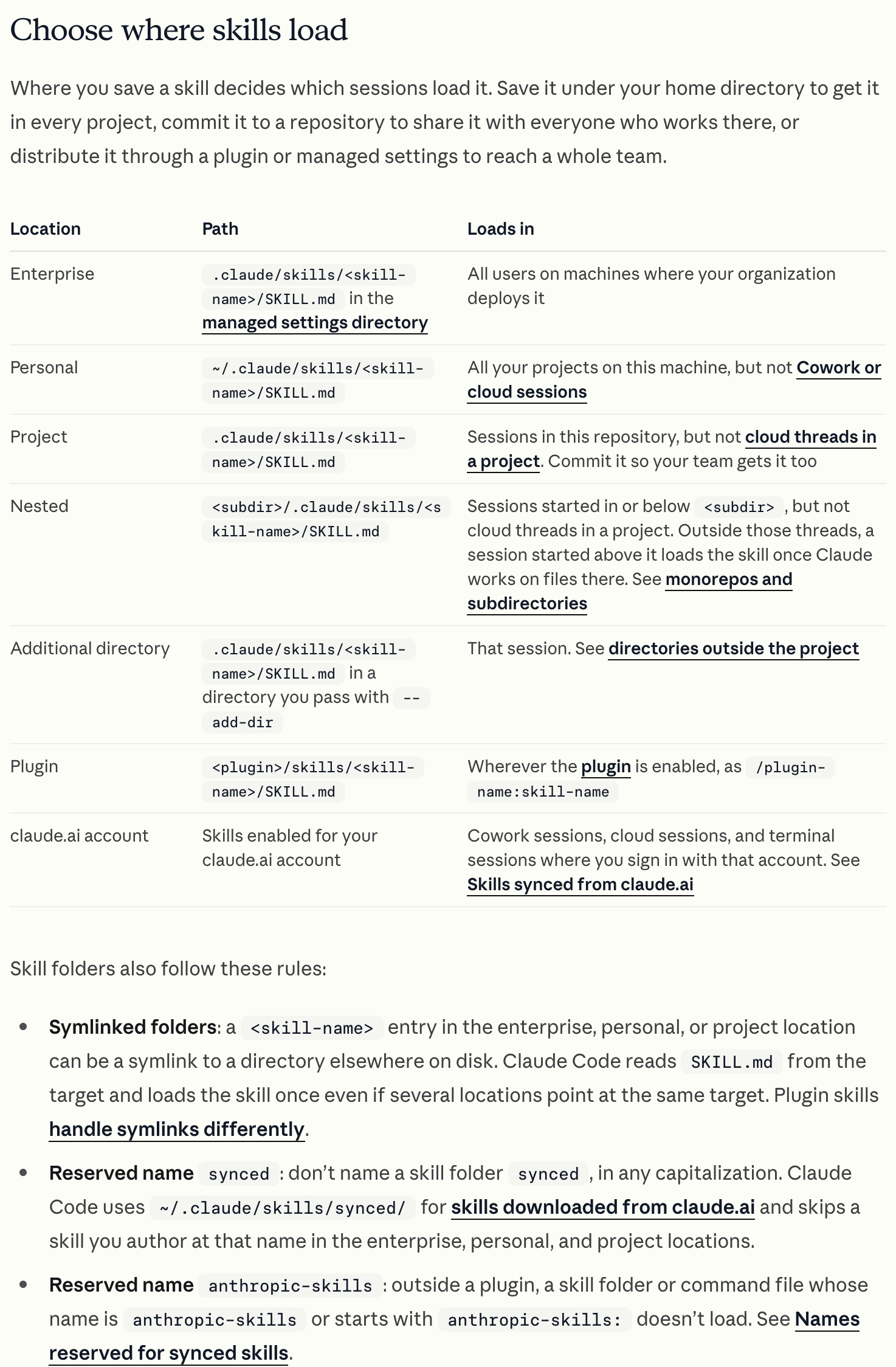
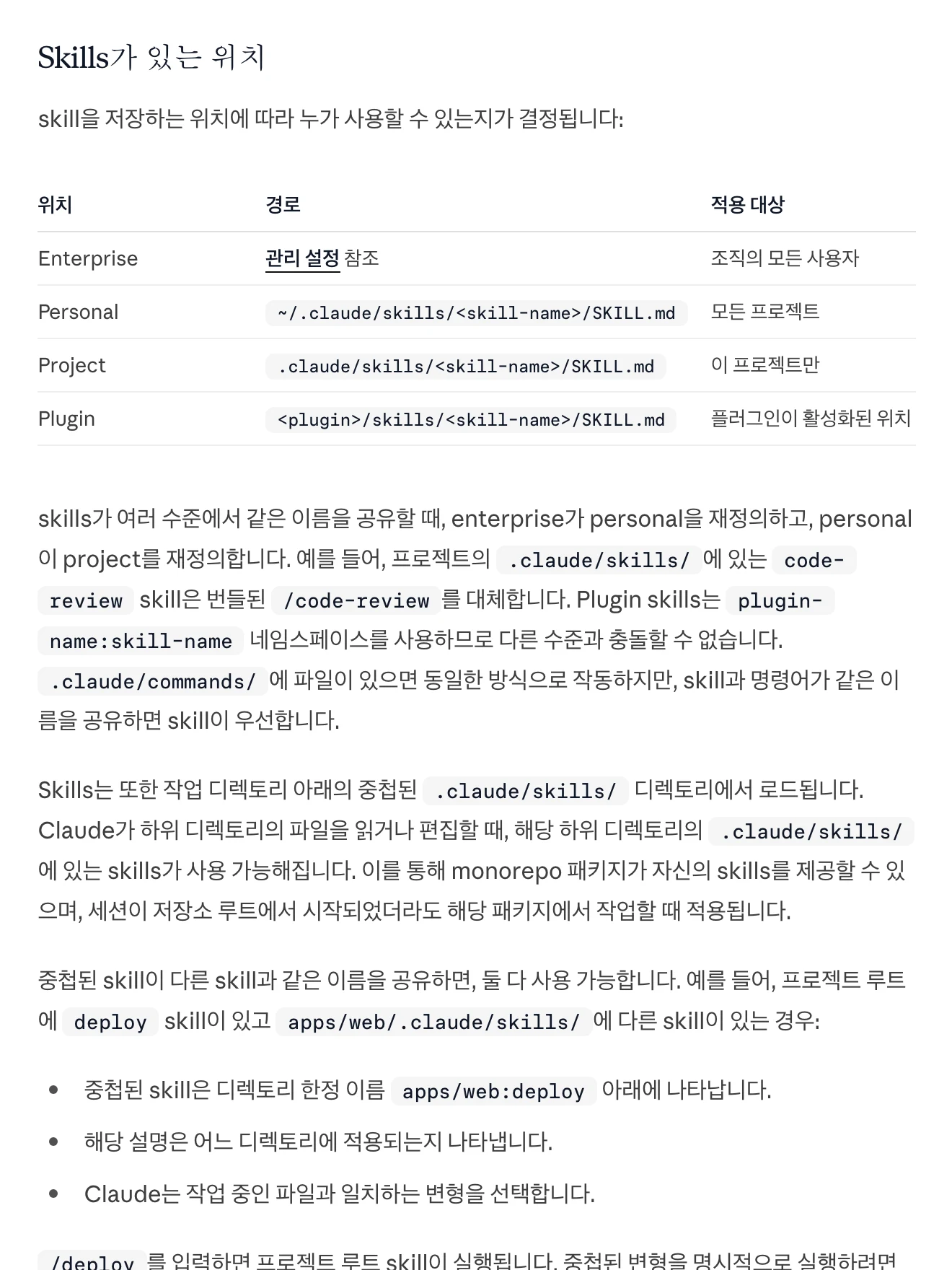
Claude Code supports project .claude/skills and personal ~/.claude/skills. Codex uses project .agents/skills and personal ~/.agents/skills.
Cursor supports .cursor/skills and compatibility locations. Paths and priority differ; check the current official documentation for each tool. After moving a folder, inspect the skill list in a new session.
| Tool | Project skill folder | Personal path and checks |
|---|---|---|
| Claude Code | .claude/skills | Also supports personal ~/.claude/skills. |
| Codex | .agents/skills | Also uses personal ~/.agents/skills. |
| Cursor | .cursor/skills | Check current official documentation for compatibility paths and priority. |
View original Korean screenshot
Choose a source of truth for multiple tools
Copies of a skill in multiple folders can drift apart. Agree on a team source location and record how it is made available to other tools.
You can use a symbolic link to point at a source. Check operating-system and tool support first, and inspect any existing folder before applying it. Keeping team skills in a repository and personal ones in a personal folder helps distinguish them.
- .agents/skills/One source copy
- my-skill/One folder per skill
- SKILL.mdEdit this source file
- .claude/skillsA link to the source folder
Put shared project rules in AGENTS.md
Use AGENTS.md for recurring project rules such as edit boundaries, commands and validation. Put a specific procedure such as report writing or code review in a skill.
CLAUDE.md can serve a similar purpose in Claude Code. To manage common content in one place, use a supported document-reference method and check that files do not contain conflicting rules.
If the result differs, check whether the skill ran
First check whether the AI read the relevant SKILL.md. If it is absent from the list, check location and format; if listed but not selected, check the description and invocation.
If it was read but failed, check executables, MCP connections, permissions and project instructions. The model can also affect results. Describe the difference between expected and actual results when revising.
Avoid duplicate skills with the same name
The selected version can be hard to determine when different folders contain skills with the same name. Check each tool’s priority and remove unnecessary copies.
Inspect both folder names and the SKILL.md name setting. Naming rules differ between tools, so do not assume changing a folder name resolves every conflict.
- The same skill exists in two folders
- AGENTS.md and CLAUDE.md disagree
- It is hard to know which tool has the latest version
- The source files live in one place
- One rules file references the other
- There is one place to update
Compare results using a small input
Save the input and output from a simple task in the original tool. Load the same skill and input in the new tool, then compare output format and missing steps.
Even after one success, retest if the model or connected service changes. Record the tools and settings used in the skill description for the next migration.
Try the same skill folder in both tools with a low-cost example.
View original Korean screenshot

Frequently asked questions
Can Codex or Cursor use skills from Claude Code unchanged?
All three support SKILL.md, so basic procedures can be reused. Tool-specific commands, settings, programs and MCP connections may differ. Put the skill in a supported path and check recognition and results.
How do AGENTS.md and skills differ?
AGENTS.md holds recurring project rules such as edit boundaries, commands and validation. A skill holds a particular procedure such as reporting or code review. Consult each tool’s guidance on instruction scope and invocation.
Must I copy a skill for each tool?
You can copy it, but manage version drift. Another option is a common source connected through paths each tool supports. For symbolic links, verify OS and tool support and inspect existing folders first.