 guide
How to create a Claude agent: start with one subagent file
There are two ways to use a Claude agent. In the Claude app you describe the outcome and hand over the whole task. In Claude Code you create your own subagent from one file that states its role. This guide covers how to create, save and call a subagent, and how it differs from skills and agent teams.
Translated from Korean. View original. Some screenshots are available in Korean only.
In this guide
- What does “Claude agent” refer to?
- How do I hand over work without code?
- What is a subagent, and why use one?
- How do I create my first subagent?
- Where does the file go, and what goes in it?
- How do I call the subagent I created?
- How do skills, subagents and agent teams differ?
- What should I check when a subagent is not used?
- When is it better not to use one?
- Frequently asked questions
- Sources
What does “Claude agent” refer to?
“Claude agent” covers several things. In the broadest sense it means Claude doing more than answering: reading files, using tools and working through several steps on its own. Handing a whole task to the Claude app counts, and so does keeping a subagent for each role in Claude Code.
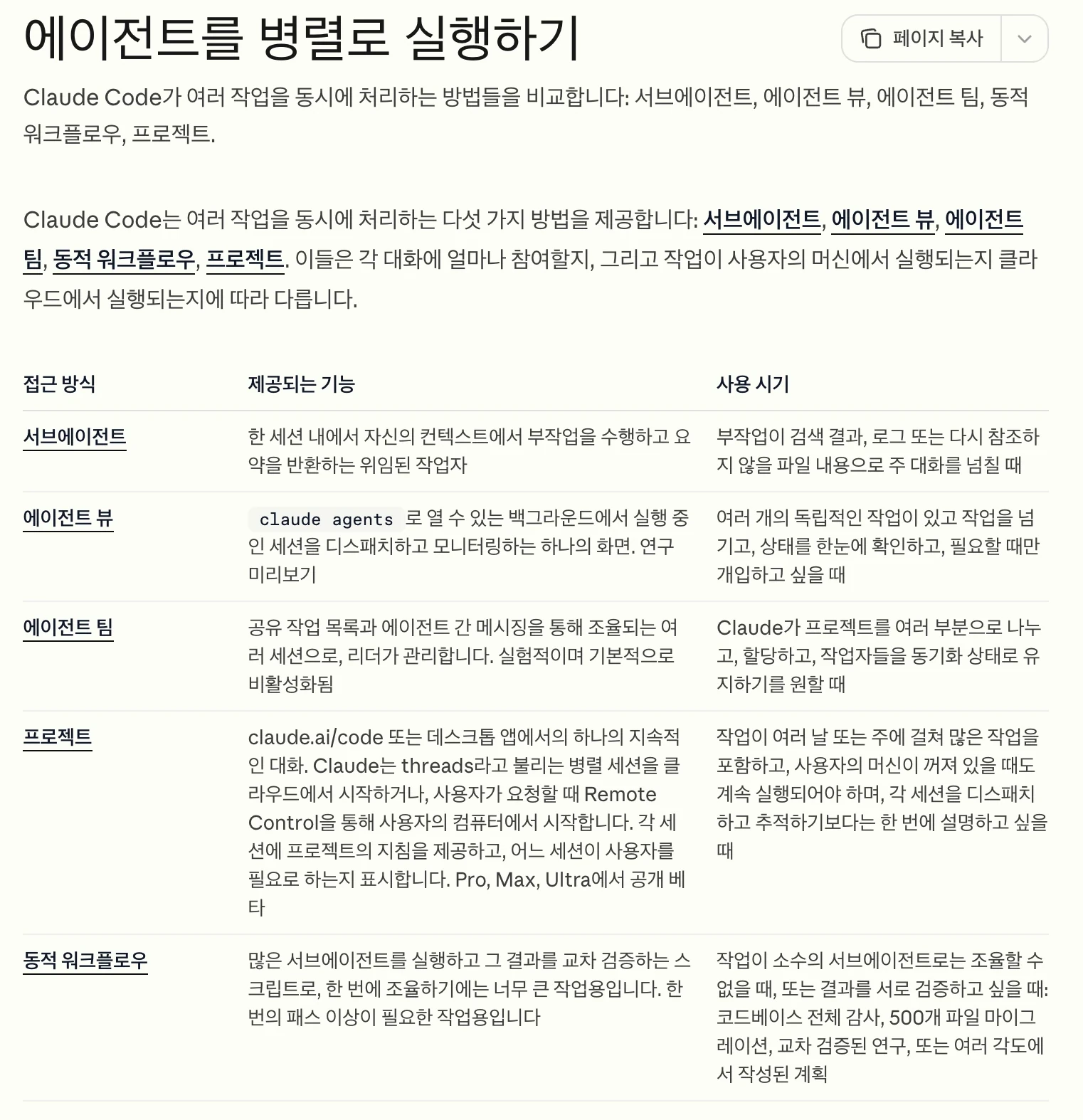
To begin, remember two paths. To hand over document and research work without code, use the Claude app. To keep a dedicated role for work you repeat, use subagents in Claude Code. Agent teams and agent view can wait until later.
| Option | What it is | Status |
|---|---|---|
| Hand it to the Claude app | Describe the outcome in a conversation and Claude works through the steps. The former Cowork is now part of chat | Rolling out on paid plans |
| Subagents | Workers inside one Claude Code session that work separately and return only a summary | Built in |
| Agent view | Dispatch and monitor several background sessions from one screen | Research preview |
| Agent teams | Several sessions that share a task list and message each other | Experimental, off by default |
| Agent SDK | The same agent capabilities in your own app, in Python or TypeScript | For developers |
The comparison table from the official documentation. Check the linked page for the current status of each option.
View original Korean screenshot
How do I hand over work without code?
Write the outcome you want in a conversation in the Claude app. Anthropic announced on September 16, 2026 that Cowork and chat had become one. In the new experience there is no mode to choose: Claude searches the web, reads your files, runs code and puts the results together. You get finished files back, such as documents, spreadsheets with working formulas and presentations.
The experience is rolling out in stages to the Pro, Max and Ultra plans, and on Team and Enterprise it depends on the organization's settings. Longer tasks keep running in the cloud after you close your laptop. Tasks that use folders or apps on your computer need the Claude desktop app open. A permission setting in the message box lets you choose whether Claude asks before each action (Manual) or keeps working while automated safety checks run (Auto).
What is a subagent, and why use one?
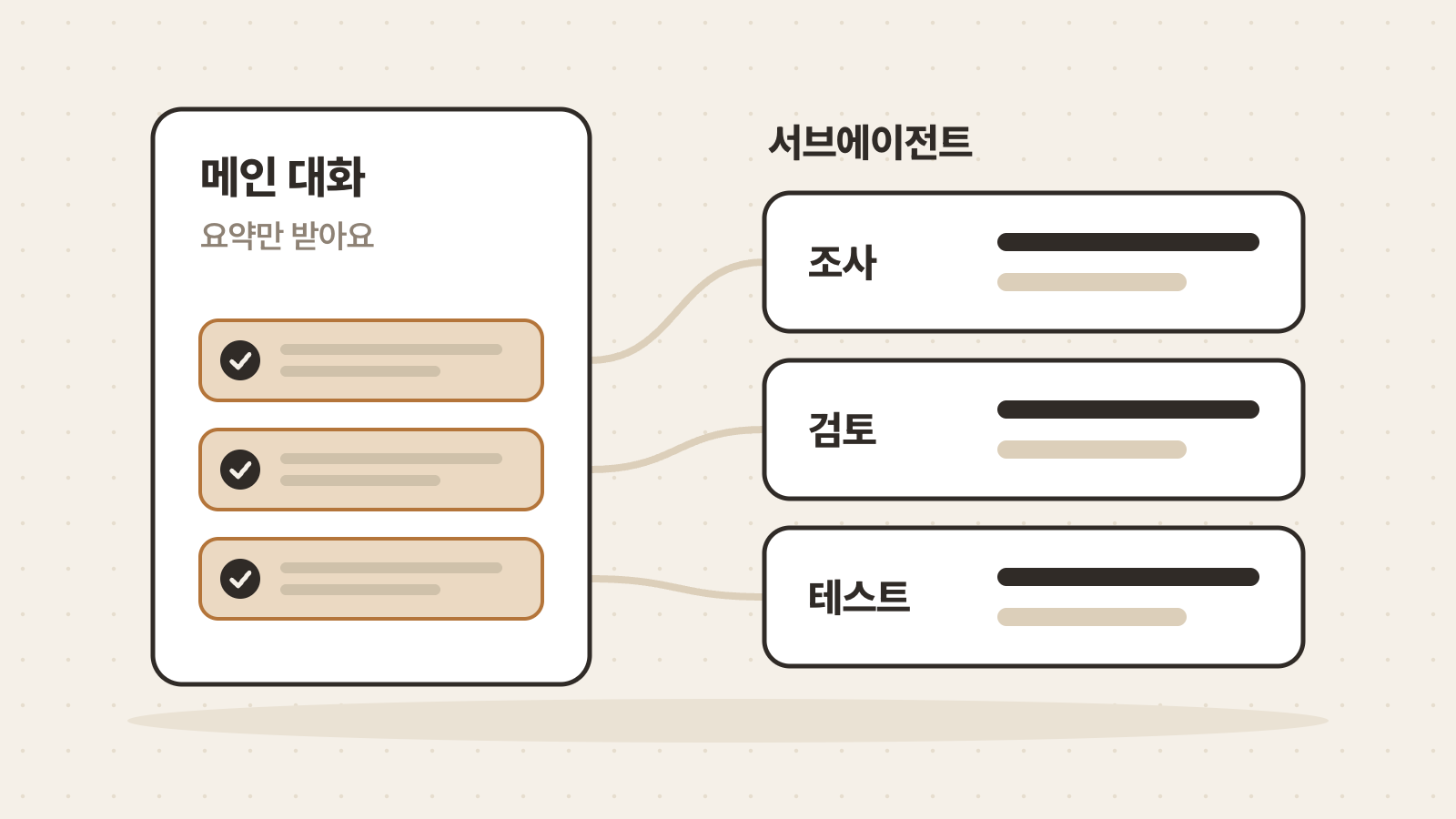
A subagent is a dedicated worker for one kind of task. According to the Claude Code documentation, a subagent works in its own context window and returns only a summary. That keeps search results, logs and other content you will not look at again from filling up the main conversation.
Claude Code already includes built-in subagents: Explore, which searches files and code read-only; Plan, which gathers context before a plan is presented; and General-purpose, which takes multi-step tasks. You can add subagents for your own work. You can restrict the tools so one only reads, or send lighter work to a faster model.
- Files read and search results pile up in the conversation
- Good for work refined through back-and-forth
- Several steps share the same context
- It works separately and only a summary comes back
- You can restrict the tools it may use
- Good for splitting off independent work
How do I create my first subagent?
A subagent is one Markdown file with its configuration at the top. You can write it by hand, but the quickstart in the documentation shows how to ask Claude to write it. In Claude Code, describe the subagent you want and where to save it, and Claude writes a file with a name, a description, a tool list, a model and instructions.
Once the file exists, open it to check that it matches what you asked for, then call it by name. If Claude cannot find the new subagent, restart Claude Code. Note that the “/agents” command no longer opens a creation screen. It only prints a notice telling you to ask Claude or edit the files directly.
Create a personal subagent called draft-reviewer in ~/.claude/agents/.
It reads a draft article and lists awkward sentences, claims that need fact-checking and missing points.
Make it read-only so it never edits files, and have it use Sonnet.---
name: draft-reviewer
description: Reads a draft article and reports awkward sentences, claims that need fact-checking and missing points. Use when asked to review a draft.
tools: Read, Grep, Glob
model: sonnet
---
You are an editor reviewing a draft article. Read the files and never edit them.
For each problem, quote the sentence, explain why it is a problem and give a corrected sentence.
Finish with a summary of the three things to fix first.Where does the file go, and what goes in it?
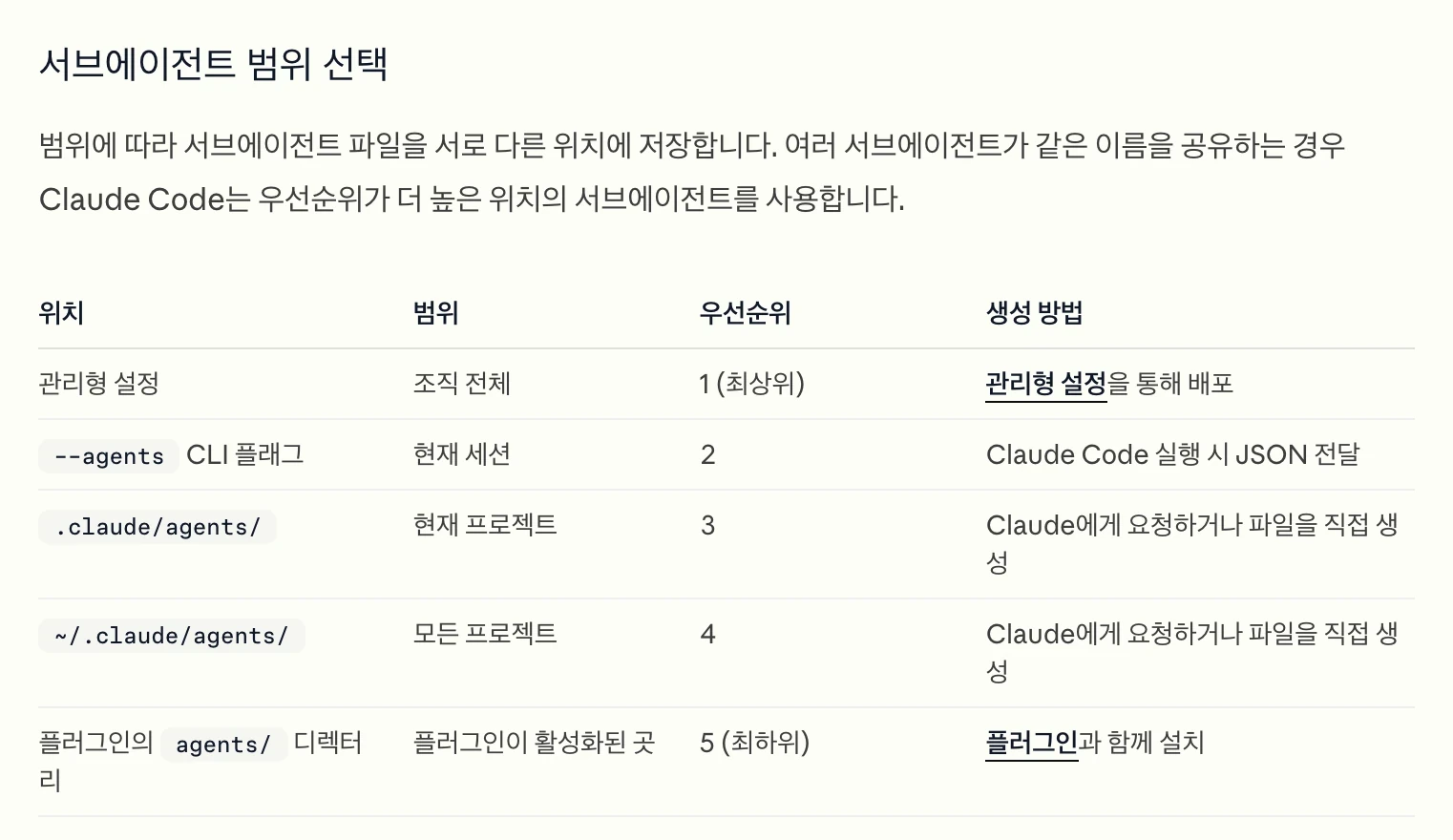
Where you save the file decides where it applies. In a project's .claude/agents/ folder it works only in that project, and checking it into the repository shares it with your team. In ~/.claude/agents/ on your computer it works in every project. When the same name exists in more than one place, the higher-priority location wins, and the project comes before the personal folder.
Configuration goes between the “---” lines at the top, and the instructions the subagent follows go below. Only two fields are required: name and description. Claude uses the description to decide when to hand work to this subagent, so write which requests it is for in the words you actually use. Edits to the file are picked up within a few seconds.
| Field | Required | What to write |
|---|---|---|
| name | Yes | A unique name for the subagent. It cannot contain a colon (:) |
| description | Yes | When Claude should delegate to this subagent |
| tools | No | The tools it may use. If omitted, it inherits every available tool |
| model | No | A model such as sonnet, opus or haiku. If omitted, Claude Code chooses |
| skills | No | Names of skills to preload when it starts |
- my-project
- .claude
- agentsUsed only in this project
- draft-reviewer.mdOne file per subagent
- skillsSkills are kept separately here
The table of locations and priority in the official documentation.
View original Korean screenshot
How do I call the subagent I created?
Claude hands work over on its own. It decides whether to delegate from your request, the subagent's description and the current context. The more specific the description, the more reliably the subagent is used.
There are three ways to call one directly. Mention its name in the request and Claude usually delegates. Type “@” and pick it from the list to tell Claude to run that subagent for the task. To run a whole session as one subagent, start it from the terminal with “claude --agent name”.
Use the draft-reviewer subagent to review the guide.md draft@agent-draft-reviewer review the guide.md draftclaude --agent draft-reviewerHow do skills, subagents and agent teams differ?
A skill is a method, and a subagent is a worker that takes the job separately. A skill is loaded into the main conversation's context and supplies the order of work and the criteria. A subagent works in a separate context and returns only a summary. The documentation also suggests a skill when you need a reusable workflow that runs in the main conversation.
You can use them together. List skill names in the skills field of a subagent file and the full content of each skill is injected into the subagent when it starts. Agent teams go a step further: several sessions share a task list and message each other. They are still experimental and off by default, and they use far more tokens than a single session, so consider them only when subagents are not enough.
---
name: report-writer
description: Writes a draft weekly report in the team's format.
skills:
  - weekly-report-format
---

Write the draft report following the format and order in the preloaded skill.| Aspect | Skill | Subagent | Agent team |
|---|---|---|---|
| What it is | Instructions and material that describe a method | A dedicated worker that works separately | Several sessions that talk to each other |
| Where it works | The main conversation's context | Its own context | An independent context per session |
| Result | Continues directly in the conversation | Only a summary returns to the main conversation | Teammates message each other directly |
| Status | Built in | Built in | Experimental, off by default |
What should I check when a subagent is not used?
First check that the file was loaded. According to the documentation, Claude Code skips files whose format has a problem. Without a name it treats the file as a document, and it skips a file with no description or with YAML it cannot parse. If the opening “---” is not the first line, it reads the file as having no configuration.
If the file loads but is not used automatically, revise the description. Write which requests it is for in the words you actually use, and compare with what happens when you point to it with “@”. To look further, run “claude --debug” in the terminal and read the debug log.
- Is the opening “---” on the first line of the file?
- Are both name and description present?
- Does the name contain a colon (:) or start with “-”?
- Is there another subagent with the same name in a different folder?
- Does it run when you point to it with “@”?
When is it better not to use one?
Not everything needs to be split up. The documentation says to use the main conversation for work that needs frequent back-and-forth, for phases that share significant context such as planning, implementing and testing, and for quick, targeted changes. A subagent starts fresh, so it needs time to gather context.
Consider the cost too. A subagent's requests count against the same usage limits as the main conversation, and running several at once multiplies token usage. Claude Code is included in every paid plan and shares its limits with chat. Create one subagent, use it on real work a few times, then add more.
Frequently asked questions
Do I need to know how to code to create a Claude agent?
No. A subagent is a single Markdown file, so you do not write code. Describe the role and where to save it in Claude Code, and Claude writes the file. If the terminal is unfamiliar, begin by describing the outcome you want in a conversation in the Claude app.
How is a subagent different from a skill?
A skill is a set of instructions describing a method, and it runs in the main conversation's context. A subagent is a worker that works in a separate context and returns only a summary. You can combine them by listing skills in the subagent's skills field.
Does using subagents consume more of my usage?
A subagent's requests count against the same usage limits as the main conversation, and running several at once multiplies token usage. In return, long search results and logs stay out of the main conversation, which helps it last longer.
Can a subagent call another subagent?
According to the documentation, by default subagents can spawn their own subagents up to three layers below the main conversation. To stop one subagent from doing so, leave Agent out of the tools list in its file.
Where did Claude Cowork go?
Anthropic announced on September 16, 2026 that Cowork and chat had become one Claude. On accounts with the new experience there is no “Chat” or “Cowork” option to choose, and you can hand over a whole task from any conversation. Existing Cowork tasks and settings carry over.
Sources
- Create custom subagents (Claude Code documentation)
- Run agents in parallel (Claude Code documentation)
- Orchestrate teams of Claude Code sessions (Claude Code documentation)
- Agent SDK overview (Claude Code documentation)
- Claude Cowork and chat are now one Claude (Anthropic)
- Claude Cowork and chat are one Claude (Anthropic Help Center)
- Pricing (Anthropic)